

Have Queries? Ask our Experts
With a Data Science Course in Chennai, you will be able to gain valuable insights from both structured and unstructured data. This, in turn, will help you build a successful career as a Data Science expert. Besant’s Data Science Training in Chennai is the best all-inclusive course to invest in which will help you land a lucrative IT job as Data Scientist, Data Analyst, Data Engineer, Data Architect and so on.
Data science is an interdisciplinary approach to extracting information from structured and unstructured data. Various techniques, systems, algorithms, and scientific methodologies extract significant insights from random data. This field focuses on changing data for analysis and visualizations while also utilizing artificial intelligence to provide predictions. Data science requires artificial intelligence.
Data scientists are in high demand because we live in a data-driven world. Data scientists are a new breed of professionals who are currently in high demand. This term was formed a few years ago by data leads for the corporations LinkedIn and Facebook. Moreover, today, there is a massive influx of data scientist nerds working in many industries. This demand arose from an unexpected need for brains who could wrangle data and aid in discovering new information, allowing corporations to make data-driven decisions.
As the world evolves following the latest trends and technology, so do the career opportunities after data science courses.
Here are a few job openings in India for Data Science certification course graduates.
(1). Data Scientist – According to LinkedIn , the average salary for a data scientist is $850,000. With five to eight years of experience, a mid-level data scientist can earn around $100,000 per year. Early-career data scientists with one to two years of experience earn approximately $6,11,000 per year. The data scientist course is the most popular today.
(2). Machine Learning Engineer – According to Glassdoor’s most recent data, the average income of a Machine Learning Engineer in India is $8,06,895. The salary for a Senior Machine Learning Engineer might be up to 13L per year.
(3). Data Mining Engineer – According to Glassdoor , the average compensation for a Data Mining Engineer in India is 61,544 per month.
(4). Data Architect – According to Ambition Box , the average income for a Data Architect in India ranges from 10.0 lakhs to 37.0 lakhs, with an average yearly salary of 21.5 lakhs.
Click Here! → Get Free Data Science Tutorial!
If the terms Machine Learning, AI, or Business Intelligence pique a student’s interest, Data Science is the course for them. This course will pay well and secure their professional future. However, it will also help them better understand many aspects of Data Science.
Let us take a glimpse at the benefits of taking a Data Science course:
Besant Technologies is well-known for offering the best online training courses in Chennai using cutting-edge technology, procedures, and programs. This Data Science Training Institute in Chennai is an excellent choice for anyone interested in learning data science for the following reasons
There is no upper age barrier or minimum educational requirement for eligibility. Students are welcome to join Besant Technologies’ Data Science Course if they are motivated to study. However, familiarity with computer science, programming language, and software skills such as SQL, Python , Java , Hadoop , and others and solid knowledge of algorithms, mathematics, and calculations and programming skills will be advantageous.
If they want to develop their career and earn much more money, obtaining a certification from India’s top online classroom training course providers is the best option.
Get upto 30%* Discount in all courses. Limited Offer. T&c Apply.
Register nowAll students at Besant Technologies have flexible schedules. The data science class schedule for the data science classroom training course can be seen below. Please let us know if the schedules do not match.
Besant Technologies Certification is Accredited by all major Global Companies around the world. We provide after completion of the theoretical and practical sessions to fresher’s as well as corporate trainees.
Our certification at Besant Technologies is accredited worldwide. It increases the value of your resume and you can attain leading job posts with the help of this certification in leading MNC’s of the world. The certification is only provided after successful completion of our training and practical based projects.
Having a certificate for Data science will increase your placement chances in top companies. Candidates possessing data science certificates stand out from the crowd and have a greater probability of achieving their dream careers. There are many standard industry recognizable data scientist certification programs.
Besant technologies provide the certificate for Data Science. It helps the candidates to prove their skills with industry standards.
Besant Technologies is a reputed institute that has trained over 10000 plus students. Besant technologies’ certificate for Data science will help you to kickstart your career as a data scientist and will help you to land in data science job. Besant Technologies certification will help you to gain real-time hands-on experience from industry guru’s.
The duration differs for weekday and weekend batches. For weekday batches, the estimate duration is between one to two months. For weekend batches, the estimate duration is about two months. For fee details, Kindly contact us.
You can take the Exam until you pass it. there are no limited attempts.
We conduct exams and provide certificates And if one fails, the exam can be retaken immediately.
There is no industry these days, that doesn’t deal with data. To be honest, data is everywhere. And to extract meanings out of so much of the data available at hand, you need data science knowledge. But where to get this knowledge from? Well, there is no dearth of Data Science Certification Courses these days. All you need is to select one as per your need and convenience and you are good to go. With a certification course in data science, you can make yourself eligible for any data science job available in the job market. This certification acts as a testimony to your knowledge of data science.


Enroll for Classroom, Online, Corporate training.
Tell us what you’re looking for. Our expert team will help you find the best solution.
Contact salesStart learning
Enquiry nowContinue browsing
See all coursesNo.8, 11th Main road,
Vijaya nagar,
Velachery, Chennai – 600 042
Tamil Nadu, India.
1st Floor, No.2A
Duraisami Reddy Street,
West Tambaram, Chennai – 600 045
Tamil Nadu,India.
No. 5/318, 2nd Floor, Sri Sowdeswari Nagar,
OMR, Okkiyam Thoraipakkam, Chennai – 600 097
Tamil Nadu, India.
First Floor, 105C,
Mount Poonamallee Rd,
Sakthi Nagar, Porur,
Chennai, Tamil Nadu 600 116
No.AK-2, RBN Tower, 1st Floor,
4th Avenue, Shanthi Colony,
Anna Nagar, Chennai - 600 040
Tamil Nadu, India
48/4 ,2nd Floor, N Usman Rd,
Parthasarathi Puram, T. Nagar,
Chennai, Tamil Nadu 600017
Plot no:140, 74/1 1st Floor, Janaki
Commercial Complex, Lattice Brg Rd
Thiruvanmiyur, Chennai - 600041
No.37, 1st Floor, Thiruvalluvar Salai,
Maraimalai Nagar,
Chennai 603 209,
Tamil Nadu, India
No. 4/76, Ambedkar Street, OMR Road,
Egatoor, Navallur,
Siruseri, Chennai 600 130
Tamil Nadu, India

Know more about our products, find a sales partner and get specific answers from our expert team any time.
Get SupportAdditional Info of Data Science Training in Chennai
Besant Technologies Provides Best Data Science Training in Chennai– Velachery, Tambaram, OMR, Porur, Anna Nagar, T-Nagar, Adyar, Thiruvanmiyur, Siruseri and Maraimalai Nagar. We train the students from the basic level to advanced concepts with a real-time environment. We offer Best Data Science Courses in Chennai with 100% Placement Assistance. We rated as the No 1 Training Institute for Data Science/Analytics Courses with Python, R, SAS, and Excel.
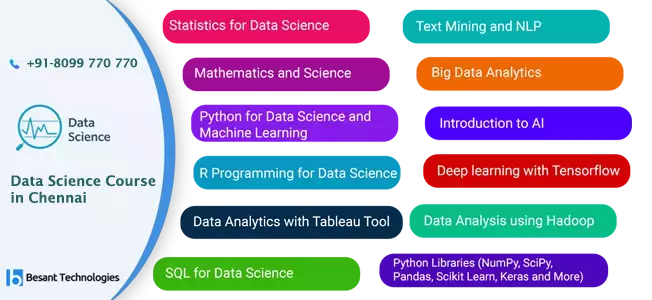
From this Data Science Training, you will get real-time exposure in statistics, Machine Learning, Deep Learning, Tensorflow, Artificial intelligence, and machine learning algorithm Concepts. This course includes concepts from statistics, computer science, & software engineering. We learn the necessary skills to manage & analyze data. We learn concepts such as exploratory data analysis, statistical inference, machine learning, & high dimensional data analysis.
We, at Besant Technologies, provide the best training for the Data Science course. We have designed the course in such a way that helps to kickstart your career into the data science field and to take up different roles such as Data Scientist, Data Engineer, Data analyst and so on.
We design the syllabus as per the latest industry standards.
Companies prefer people with relevant experience to fill their Data science-related positions. The two common languages used are Python and R along with SQL.
The following are the skills that are associated with data science.
Data Science is an interdisciplinary approach to deriving insights from structured and unstructured data. Various processes, systems, algorithms and scientific methods are used for the extraction of meaningful insights out of random data.
There are numerous reasons for you to take our Data Science Course in Chennai, but we recommend this course for the diverse career avenues it can open up for anyone. What learning outcomes can you expect from this course? Read on to find out.
Over the years, data science has become an essential part of every business. It solves many problems within a given field through data analysis and interpretation of various data. There are few online resources stating that the candidate needs to be skilled in database query languages, software development, mathematics, programming visualization station, statics the etc as a basic requirement to become a data scientist.
This might discourage the beginners, who enter dreaming of becoming a Data Scientist. There are few institutes like Besant technologies that offer specialized programs, tailored to the educational requirements to pursue a career in data science. However, the skills aren’t mandatory for a beginner, as there are many MOOCs that will help one to learn those required skills. Also, many senior data scientists have mentioned that Data Scientist is a blanket job with varied types of data and skills. These skills need to be developed over time in order to match the available data science job. Though there is too much confusion, still the questions might vary from every person based on their individual needs and qualification. To get clarity on this, here is the answer to a set of few questions with the both technical and non-technical disciplines that arise with the candidate.
Technical skills
A Masters degree or a Ph.D. in data science is required for professionals who need to place themselves in the top positions with some good years of experience. But it is not required for a beginner and also there is a number of possible ways available today to learn data science for working professionals even which are flexible yet valuable. The real Data science experience is gained by the real time experience gained in addition to the course. But still, expertise with a Ph.D. can always prove with their knowledge and be in the top positions. This scenario is very true with Google, as they recruit only the Ph.D. or Masters degree holders for Data scientist positions.
People from diverse backgrounds like economics, operations research, statistics, computer science, mathematics etc are practicing as the data scientist. This is because, being familiar with the basic concepts of statistics and maths with linear algebra, probability, calculus etc is essential to understand data science.
Programming and well versed with its terms is the basic requirement of a data scientist. Having a basic knowledge and programming skills of C, C++ or Java is required, as this will help in understanding the programming tools like R ad Python. Writing efficient code and analyze big data with those codes is all about data science. Though expertise programming skill is not required the basic knowledge is mandatory.
SQL language fundamentals in creating indexes, group by, joins etc is necessary to understand data science. Also, the basic SQL knowledge will help in understanding the hadoop cluster. The emerging technologies like MapReduce, Hive, and Pig etc will be easy for SQL and HADOOP programmers to learn.
Though a data science degree is not required, it will help in better understanding the concepts. Today, technology is helping us to learn all these courses through MOOC from wherever we are. But still learning these courses will not be helpful in learning the soft skills and managing skills required for data scientist job.
Machine learning, is an integral part of data science, can be learned during the intermediate or advanced levels. But if you are skilled with machine learning, then you are half the way in your expert skills.
Although there are many IT training institutes in Chennai, you cannot take a data science course from any random institute. For desired results, you need to enroll yourself with Besant Technologies, the best institute offering Data Science training in Chennai. Besant Technologies offers Best Data Science Training Courses in Velachery, Tambaram, OMR, Porur, Anna Nagar, T-Nagar, Adyar and Thiruvanmiyur in Chennai. We teach students everything that is important- starting from basic to advanced concepts, that too in a real-time environment.
We teach you how to make use of python to look at the world of data visualization. With this knowledge, you will be able to craft your own amazing visualizations on the basis of real data. Python, being a powerful tool for statistical analysis, helps you with easy handling of data. With great readability and productivity, python does change the way you deal with data. For repeated tasks and data manipulation, there is nothing that can beat the efficiency of python in the matter of data science. Hence, if you are looking for Data Science with Python Training in Chennai, we are who you should contact without doubts and apprehensions.
R is an open source framework that traditionally used to be a major help in the fields of research and academics. Its applicability has, however, grown over time. And today, we can find its use in many fields other than the two mentioned above. There are good options in R for parallel computations. And it actually has amazing data handling capabilities. Although there are many applications of R, its best for exploring data sets and ad hoc analysis. An important benefit of handling data with R is that the latter’s library of statistical packages is huge. Starting from finance and genetics to psychometrics, R packages almost cover everything.
Advanced SAS that covers both Macros and SQL has huge varieties of statistical functions. Although there are many tools that help with data science, SAS has special significance not just in the field of data science but also advanced analytics. Throughout its rule in the market, it has been superbly adaptable and plastic. Reading data from all kinds of databases is possible with SAS. Tasks like processing of data on the RAM get easily pulled off by SAS. The probability of distribution of data and complex simulations have always been easy with SAS. You will be glad to know that we, at Besant, teach all the nitty-gritty involved in using SAS Advanced: Macros and SQL in the field of data science.
Data strategies have become all-pervasive. Starting from institutional sectors to business, almost everywhere you will find the requirement of data handling. You can consider excel to be a bridge software that helps non-data scientists to do data-related work. To acquire data-centric skills and projects, learning Excel macros is a must. Excel offers a lot of statistical functions. The modeling and data analytics capabilities of Excel are also worth taking note of. Handling real-time data with Excel is a breeze. Data validation is also something you can do with ease with excel. Hence, Excel can be a great armor in your arsenal for data science.
This first stops in the Data Science curriculum. It will help you get started with the program, plan your learning schedule, & connect with fellow students & teaching assistants. Along the way, you’ll get an introduction to working with & exploring data using a variety of visualization, analytical, & statistical techniques.
The field of data science is interdisciplinary, which encompasses a lot of areas including scientific methods, processes, systems, and algorithms. This field is deeply connected with big data and analytics. With proper training in data science, you make yourself eligible for recruitment in a lot of companies that have data handling jobs available with them. The world has been taken over by big data. And with the foothold of big data growth in the world, the need for its storage began to grow. Enterprise industries saw it as a challenge till somewhere around 2010. At that time, more emphasis was being laid on building solutions and frameworks for the storage of data. Then came frameworks like Hadoop that indeed solved the problem of data storage.
But then a new problem arose- processing of this stored data. Here comes the role of data science. In Hollywood sci-fi movies, you see a lot of seemingly unrealistic ideas. Believe it or not, all such ideas can be turned into reality with the help of data science. In another way, you can say that the future of artificial intelligence lies in data science. And that is probably the reason why data science and its courses are so much in demand. People want to learn it for lucrative IT career options. So, data science, which is a concoction of machine learning principles, algorithms, and various tools, is used to figure out concealed patterns in raw data. It is because of data science that data can be used to add value to any business. Predictive causal analytics, prescriptive analytics, and machine learning are the elements that together render data science helpful in making decisions and predictions. Here, it would be valuable to add that the future lies in the hands of data scientists. The need for data scientists that have expertise over the subject is growing with each passing day. What more? Well, data science is changing the way people look at the world flooded with data.
Combination of machine learning, Deep learning & AI.
Click Here to Check Latest Updated – Data Science Interview Questions and Answers
Besant Technologies offers Data Science Training in Chennai in more than 7+ branches with 10+ years of Experienced Expert level Trainers. Here are the key features,
Get enrolled for the most demanding skill in the world. Data Science Training in Chennai will make your career a new height. We at Besant technologies provide you with an excellent platform to learn and explore the subject from industry experts. We help students to dream high and achieve it. We have Data experts as our trainers. Our trainers have been working in top MNCs in good Data science roles and have good experience in training students. We provide training in both classroom and online modes. We do Corporate training.
If you are a business, you sure have trust in your employees. They are efficient, no doubt. But by offering them proper data science training, we will make them capable of having better insights into your company’s data. Our curriculum is comprehensive and is suitable for all kinds of employees-both from IT and non-IT backgrounds. Interestingly, our training is customizable. And we facilitate customization because we acknowledge that your company is unique and its needs are also special. With customized training to your employees, we help them improve their data science capabilities. And guess what! The training is imparted by excellent instructors, having industry experience. Don’t worry about time and place compatibility, we also offer online data science training.
Individual training is a training that is individualized to take into consideration the differences between learners. It is most suitably used in a one-to-one situation. Not like facilitated learning where the instructor takes a more passive role, with individual learning the trainer needs to consider and cater to the needs of individual participants. It doesn’t mean that students are at home they can be in a classroom and still work through things at their own pace.
We have many branches in Chennai and Bangalore. In Bangalore, We have branches in Marathahalli, Jaya Nagar, Indira Nagar, BTM layout, Rajaji Nagar and Kalyan Nagar. Our branches are situated in places which have very good connectivity. We run our classes in small batch sizes which facilitates good interaction between trainer and students. Our trainers are attentive to students in case of doubts or questions in-classroom training.
We also provide one to one classroom training where students will be given full attention as the trainer’s time is fully dedicated to one student. Fast track classroom training: This is for students with time constraints. We give the best training at a fast pace while also covering the full syllabus as in normal classroom training.
Fast Track and flexible term courses are no different from regular semester-length courses. Sessions are more intensive, and trainees attend class more hours each week to learn. what is needed to complete the course. This type of training is for those individuals who want to complete the course quickly by taking extra hours or extra classes.
We provide online training in both one to one and batch size. This is suitable for working professionals who can grasp the subject easily but cannot travel to our branches due to time constraints.
One dedicated trainer for one learner, this is an excellent way of learning to understand the content in a simple way. All the Trainers are highly qualified professionals. Besant technologies are leading in 1-to-1 training, most of the learner prefers this for various benefits. Quicker learning as you get the undivided attention of the trainer. You don’t need to wait for your turn to clear your doubts. Quality of learning has an inverse relation with the number of students in a class.
Fast Track and flexible term courses are no different from regular semester-length courses. Sessions are more intensive, and trainees attend class more hours each week to learn what is needed to complete the course. This type of training is for those individuals who want to complete the course quickly by taking extra hours or extra classes.
This type of training is for companies who want to train, retrain, and jointly educate employees and managers in order to grow. We love to give corporate training as we have experienced professionals who can train you at your place with excellent teaching methodologies and help to grow your company at the highest peak. We provide world-class training for corporate professionals. This is specialized and customized training based on your business requirements.
Click Here to Know About → Data Science Career Opportunities
Data Science team comprises data analyst, data scientist and data engineer, data architect, and so on. There is an increasing demand for data science roles and a big gap exists between the need and the availability. Hence, markets need more engineers in data science jobs. The industry provides the best salary for the right candidate.
The growing demand for people who are capable of mining and interpreting data is proof enough to say that there are huge career opportunities in the field of data science. And there is hardly any company that doesn’t have anything to do with data. Almost every company, irrespective of the industry in which it operates, deals with data handling. And that is why they are on a constant search for people having knowledge of data science. Starting from start-ups to big players, almost every company has a requirement for experienced people. By taking a data science course at Besant Technologies, you will be able to fill up job positions such as analytics manager, business analyst, business intelligence (BI) analyst, data analyst, data scientist, director of analytics, research analyst, research scientist, senior data analyst, statistician and the like. And to make sure you get the most lucrative jobs in the market, we offer placement assistance too.
Data scientist deals with big data and helps organizations take strategic business decisions in solving their critical business problems.
Data analysts start at an average of 3.5 lakhs per annum.
Data science is a very good career option to step up the ladder, as it is being one of the highest-paid and niche skills of the decade. Data Science is the domain which has an evergreen future. A lot of companies invest good money in doing research and innovate in this field.
Click Here to Know About → Data Science is the Backbone of the IT Industry?
If you have the desire to join our course, you can join it regardless of your educational background.
You don’t need to have any specialized IT knowledge to join our Data Science Course in Chennai. However, there are many global certification exams that require you to have specific educational qualifications.
The most popular certifications for Data Science:
There are four tracks and each track requires professional experience in the capacity of Data Scientist for at least 10 years. The tracks involve high-level topics in technology and analysis. Three tracks out of four require a degree in some master’s program. The certification is valid for a lifetime, but each track will cost more than a lot of other exams.
With this certification, you get valuable big data insights. To earn a CAP certification, it’s required that you clear the Associate test. INFORMS members receive a discount on the certification fee. The validity of this certification is 3 years.
You can get this one via board review and application, rather than traditional coursework or exams. As you move through its different certification levels which are three in total, you gain experience which gets reflected in your certification. The certification’s validity is for a lifetime.
There are five tracks to this certification. Each track demands different experience. The 1st track requires a minimum of 5 years of Data Science professional experience and a bachelor’s degree. Remaining tracks need you to have a master’s in addition to other certifications. Make sure you check the requirements of each program. This program is multifaceted in nature. The validity of DASCA’s certification is 5 years.
This program requires participants to have some programming experience in SAS or some other language. This certification covers nine courses that will cover basic statistics, data analysis, communication and programming and data tools. It is valid for a lifetime.
With this certification, you will know a lot about predictive modeling, data optimization etc. To earn the certification, you must have done nine courses besides clearing three exams. A minimum of 6 months of experience is required in SAS or some other language. If you have a minimum of 6 months worth experience in Data Science for businesses, then it’s highly recommended that you do this course. This certification has a lifetime validity.
The SAS certifications you have read about above combine with this course to earn you an extra distinction. To be eligible for this program, you must have cleared the earlier courses. It teaches improvement and management of data as well as its manipulation and access. Additionally, you will master using tools for data visualization. The validity of the certificate is for a lifetime.
Mastery in three tracks are required to obtain this certification. They all focus heavily on using Google Cloud for analyzing data. There are also modules that focus on machine learning and data engineering. The certification’s validity lasts for lifetime.
This exam is for candidates that are familiar with GCP or Google’s cloud platform. It tests a candidate’s knowledge in this area. Your understanding of the models of machine learning starting from design through security and operation will be assessed. This certification does not expire.
The test assesses your knowledge of the enterprise software by Cloudera. This exam also tests your knowledge in programming, analyzing and administering on Cloudera. All these skills are essential for Data Scientists, making this certification useful for beginners. The certification has a validity of two years.
It is for nine courses and covers areas like a capstone in applied Data Science, machine learning, SQL, Python and databases, data analysis and visualization etc.
Register for a subscription online to complete the program according to your convenience. Once you have completed the training, you can include the project portfolio in your resume. It’s however recommended that you complete the program in three months. The certification is valid for life.
This exam is only available for those who have cleared the Associate test. This is a high- level, performance-oriented certification which needs you to have deep knowledge of data engineering. Data Scientists that develop and design for production ecosystems benefit immensely from this course. The test lasts for 4 hours and requires you to resolve a variety of customer problems with the help of Cloudera Enterprise cluster. The certification expires in 3 years.
The training to earn this certification takes place in 2 levels. You first receive the associate certification in Data Science basics and big data analysis. The second program covers platforms such as Hive, natural language processing, Hadoop and HBase, visualization methods and more.
Microsoft offers a wide range of specialties and IT skills, including this certification. The tracks on Data Science include data analysis, management, and its applications in businesses. The certification involves rigorous assessment. And it has a validity of 3 years.
For this certification, you must have expertise in applying Data Science to run and implement machine learning with the help of Azure. You need to have experience with Data Science, Azure Data bricks and Azure Machine Learning. This certification is valid for a lifetime.
Many popular computer languages and database software known to the world such as Java and MySQL are owned by Oracle. Oracle’s BI tools are in use in many big companies, so becoming certified in this course can add value to your skills. Oracle offers several in-person and online tests to offer relevant certifications.
This certification involves training in the development of analytical methods, model building, lifecycle management, and analytic problems. It also provides data acquisition and implementation. The exam doesn’t focus on one platform, it covers all aspects of Data Science. A degree in some bachelor’s program is required, along with a minimum of 3 years of analytics experience. INFORMS requires that candidates verify their skills by their employer.


